
icon-fonts解决方案可以一次性加载纯色图标,并且相对于精灵图更小更灵活;那渐变色或者组合颜色的图标怎么办呢,答案之一就是svg

1.svg是矢量图像,可以无限缩放,而且图像质量不会下降
2. svg图像比 jpg 或 png 图像更灵活,我们可以使用 CSS 和 JavaScript 与它们进行交互,比如在 css中用fill属性控制svg颜色
3. svg基本上可以放心使用,除非你要用在IE8或老版本安卓机[^1]**中;
4. SVG Sprite技术,这里所说的Sprite技术就是类似于CSS中的Sprite技术。图标图形整合在一起,实际呈现的时候准确显示特定图标。
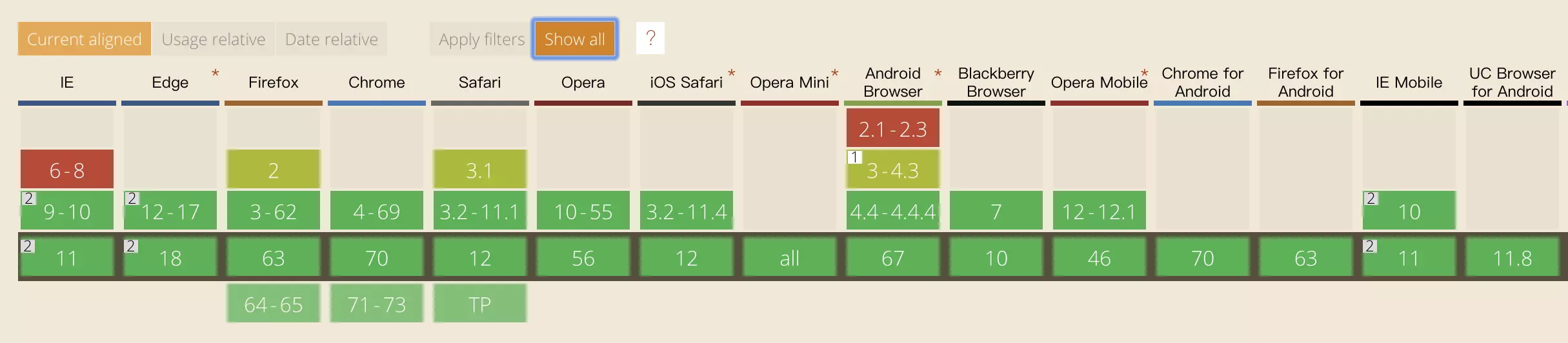
svg的兼容性说明
实际上就是把所有的当前页面用到的svg使用symbol标签都放在一个svg中加载到body顶部,使用的时候再用use标签的xlink:href=”#xxx”根据symbol的id调用
[^1]: svg的说明

安装依赖

1
2
// 读取svg信息,去除svg中的无用标签,精简结构
npm install svgo svgo-loader --save-dev
1
2
// SVG Sprite插件
npm install svg-sprite-loader --save-dev

配置 vue.config.js

1
2
3
4
5
6
7
8
9
10
11
12
13
14
15
16
17
18
19
20
21
22
23
24
25
26
27
28
29
30
31
32
33
34
35
36
37
38
39
40
41
42
43
44
45
46
47
48
49
50
51
const path = require('path')

function resolve (dir) {
return path.join(__dirname, './', dir)
}

module.exports = {
chainWebpack: config => {
config.plugin('define').tap(args => {
const argv = process.argv
const icourt = argv[argv.indexOf('--icourt-mode') + 1]

args[0]['process.env'].MODE = `"${icourt}"`

return args
})
// svg rule loader
const svgRule = config.module.rule('svg') // 找到svg-loader
svgRule.uses.clear() // 清除已有的loader, 如果不这样做会添加在此loader之后
svgRule.exclude.add(/node_modules/) // 正则匹配排除node_modules目录
svgRule // 添加svg新的loader处理
.test(/\.svg$/)
.use('svg-sprite-loader')
.loader('svg-sprite-loader')
.options({
symbolId: 'icon-[name]',
})

// 修改images loader 添加svg处理
const imagesRule = config.module.rule('images')
imagesRule.exclude.add(resolve('src/icons'))
config.module
.rule('images')
.test(/\.(png|jpe?g|gif|svg)(\?.*)?$/)
},
configureWebpack: {
devServer: {
open: true,
// https: true,
proxy: {
'/user': {
target: 'https://devadminschool.icourt.cc',
},
'/live': {
target: 'https://devadminschool.icourt.cc',
},
},
},
},
}

在vue脚手架生成的文件夹下的src/components创建一个Svg

1
2
3
4
5
6
7
8
9
10
11
12
13
14
15
16
17
18
19
20
21
22
23
24
25
26
27
28
29
30
31
32
33
34
35
36
37
38
39
40
41
42
43
44
45
46
47
48
49
50
51
52
53
54
55
56
57
58
59
60
61
<template>
<div v-if="isExternal" :style="styleExternalIcon" class="svg-external-icon svg-icon" v-on="$listeners" />
<svg v-else :class="svgClass" aria-hidden="true" v-on="$listeners">
<use :xlink:href="iconName" />
</svg>
</template>

<script>
import { isExternal } from '@/utils/validate'

export default {
name: 'SvgIcon',
props: {
iconClass: {
type: String,
required: true
},
className: {
type: String,
default: ''
}
},
computed: {
isExternal() {
return isExternal(this.iconClass)
},
iconName() {
return `#icon-${this.iconClass}`
},
svgClass() {
if (this.className) {
return 'svg-icon ' + this.className
} else {
return 'svg-icon'
}
},
styleExternalIcon() {
return {
mask: `url(${this.iconClass}) no-repeat 50% 50%`,
'-webkit-mask': `url(${this.iconClass}) no-repeat 50% 50%`
}
}
}
}
</script>

<style scoped>
.svg-icon {
width: 46px;
height: 46px;
/* vertical-align: -0.15em; */
fill: currentColor;
overflow: hidden;
}

.svg-external-icon {
background-color: currentColor;
mask-size: cover!important;
display: inline-block;
}
</style>

从vue-cli3基础loader中可以找到这两个loader的默认配置

1
2
3
4
5
6
7
8
9
10
11
12
13
14
15
16
17
18
// 默认的svg loader...
webpackConfig.module
.rule('svg')
.test(/\.(svg)(\?.*)?$/)
.use('file-loader')
.loader('file-loader')
.options({
name: genAssetSubPath('img')
})

// 默认的images loader...
webpackConfig.module
.rule('images')
.test(/\.(png|jpe?g|gif|webp)(\?.*)?$/)
.use('url-loader')
.loader('url-loader')
.options(genUrlLoaderOptions('img'))

在src/下创建一个icons目录

svg目录主要用于存放svg文件,来看一下index.js的内容,功能就是把组件注册到全局,方便使用:

1
2
3
4
5
6
7
8
9
10
import Vue from 'vue'
import SvgIcon from '@/components/SvgIcon' // svg组件

// 注册到全局
Vue.component('svg-icon', SvgIcon)

const requireAll = requireContext => requireContext.keys().map(requireContext)
const req = require.context('./svg', false, /\.svg$/)
requireAll(req)

在main.js中引入 import ‘./icons’ // icon

如何使用?

  • 可以把设计大大给的svg 或者从iconfont官网下载开源的icon的svg格式,复制到src/icons/svg目录 下;
  • 点击svg查看源码,修改fill属性, fill=”currentColor”,或者fill=””,如果无此属性,就不用管,这样做是可以让外部控制icon的颜色,或随父元素的color;
  • 注意svg命名和SvgIcon命名一致,看一下最终使用:
    1
    <svg-icon icon-class="go-back"></svg-icon>
    1
    2
    3
    4
    5
    6
    7
    8
    9
    10
    11
    12
    13
    14
    15
    render(h, context) {
    const { icon, title } = context.props
    const vnodes = []
    if (icon&&icon.name) {
    if (icon.name.indexOf('icon-')===-1){
    vnodes.push(<svg-icon icon-class={icon.name}/>)
    }else{
    vnodes.push(<i class={icon.name}/>)
    }
    }
    if (title) {
    vnodes.push(<span slot='title'>{(title)}</span>)
    }
    return vnodes
    }

    如何改变SVG的颜色?包括滑过变色选中变色?

1
2
3
4
5
6
7
8
9
10
11
12
13
14
15
16
17
18
19
20
21
22
23
24
25
26
<?xml version="1.0" encoding="utf-8"?>
<!-- Generator: Adobe Illustrator 22.0.0, SVG Export Plug-In . SVG Version: 6.00 Build 0) -->
<svg version="1.1" xmlns="http://www.w3.org/2000/svg" xmlns:xlink="http://www.w3.org/1999/xlink" x="0px" y="0px"
viewBox="0 0 104 104" style="enable-background:new 0 0 104 104;" xml:space="preserve">
<style type="text/css">
/*.st0{fill:#50555F;}*/
.st1{fill:none;stroke:#50555F;stroke-width:2;stroke-linecap:round;stroke-miterlimit:10;}
</style>
<g id="图层_1">
<path class="st0" d="M51.7,74.7c-3.4,0-8.9,0.7-8.9,0.7l-3.4,0.4c0,0-8.2-2.7-8.2-5.8v-1.5c0-2.9,3.8-5.8,8.2-8.1
c0.2-0.1,2.9,15,2.9,15l1.2,0c0,0-2.3-15.6-2-15.7c1.2-0.6,2-1.1,3.3-1.5c0.4-0.2,2.6-1.3,1.4-4.5c-2.8-2.8-4.7-5.6-4.7-11.8h20.6
c0,6.1-1.9,8.9-4.7,11.7h0c-1.2,3.6,0.7,4.4,1,4.5c1.2,0.4,2.4,1,3.6,1.5c0.3,0.1-2,15.7-2,15.7"/>
<path class="st0" d="M63.5,35.4c0-7.1-9.7-10.7-9.7-10.7c-1.4-0.6-2.7-0.5-4.1,0c0,0-9.7,3.1-9.7,10.7c0,1.1-2,0.9-2.7,4.5h29
C65,36.2,63.5,36.5,63.5,35.4L63.5,35.4z"/>
<g>
<path class="st0" d="M74.2,59.8c0.1-0.1,0.1-0.2,0.1-0.3v0c0-0.2-0.1-0.3-0.3-0.3H63.8c-0.2,0-0.3,0.1-0.3,0.3v0
c0,0.1,0.1,0.2,0.1,0.3c0.1,3.7,1.9,6.8,4.2,7.6c-2.4,0.7-4.1,3.8-4.2,7.5c-0.1,0.1-0.1,0.2-0.1,0.4v0.1h10.9v-0.1
c0-0.1-0.1-0.3-0.1-0.4c-0.1-3.7-1.9-6.8-4.2-7.5C72.4,66.6,74.2,63.5,74.2,59.8L74.2,59.8z M69.1,66.1v6.8c2.3,0,4.1,0.8,4.1,1.7
h-8.5c0-0.9,1.8-1.7,4.1-1.7v-6.8c-1.8-0.1-3.2-1.6-3.2-3.4c0-0.2,0.1-0.3,0.3-0.3c0.2,0,0.3,0.1,0.3,0.3c0,1.5,1.2,2.8,2.7,2.8
c1.5,0,2.7-1.3,2.7-2.8c0-0.2,0.1-0.3,0.3-0.3c0.2,0,0.3,0.1,0.3,0.3C72.3,64.5,70.8,66,69.1,66.1L69.1,66.1z M69.1,66.1"/>
</g>
</g>
<g id="图层_2">
</g>
</svg>

svg文件里面的格式是这样,但是如果想css更改颜色,一定一定一定要有path 并且 把相关类名的fill属性设置颜色给注释掉,否则不会有效果,重要的话说三遍,三遍,三。。。

参考这儿.
参考这儿.
参考这儿.